
Parquet: The Secret Weapon Behind Lightning-Fast Big Data Queries

Introduction to Parquet
Parquet is an open-source file format designed specifically for handling large datasets. Unlike traditional row-based storage formats, Parquet stores data in a columnar manner, offering superior efficiency in compression and querying. It is widely used in systems like Apache Spark, Apache Hive, and various data analytics tools.
Let's explore how Parquet works through the following code snippet:
```python
import pyarrow as pa
import pyarrow.parquet as pq
import random

# Define the number of rows, row groups, and rows per group
num_rows = 1_000_000
num_row_groups = 10
rows_per_group = num_rows // num_row_groups

# Create sample data
data = {
    "name": ["jonny_" + str(i) for i in range(num_rows)],
    "score": [i for i in range(num_rows)]
}

# Convert data to a PyArrow table and write to a Parquet file
table = pa.Table.from_pydict(data)
pq.write_table(table, "example.parquet", row_group_size=rows_per_group)
print("✅ Parquet file has been created with 10 Row Groups!")
```
1.Read and display Parquet file metadata:
# Read and display Parquet file metadata
parquet_file = "example.parquet"
pf = pq.ParquetFile(parquet_file)

print(pf.metadata)

# Loop through each row group and print column metadata
for i in range(pf.metadata.num_row_groups):
    row_group = pf.metadata.row_group(i)
    for j in range(row_group.num_columns):
        column = row_group.column(j)
        print(f"Column: {column.path_in_schema}")
        print(f"  Encodings: {column.encodings}")
        print(f"  Dictionary Page Offset: {column.dictionary_page_offset}")
        print("-" * 50)
<pyarrow._parquet.FileMetaData object at 0x7ee042065e90>
created_by: parquet-cpp-arrow version 18.1.0
num_columns: 2
num_rows: 1000000
num_row_groups: 10
format_version: 2.6
serialized_size: 2618
Column: name
Encodings: ('PLAIN', 'RLE', 'RLE_DICTIONARY')
Dictionary Page Offset: 4
--------------------------------------------------
Column: score
Encodings: ('PLAIN', 'RLE', 'RLE_DICTIONARY')
Dictionary Page Offset: 643237
--------------------------------------------------
Column: name
Encodings: ('PLAIN', 'RLE', 'RLE_DICTIONARY')
Dictionary Page Offset: 1256289
--------------------------------------------------
Column: score
Encodings: ('PLAIN', 'RLE', 'RLE_DICTIONARY')
Dictionary Page Offset: 1881067
--------------------------------------------------
Column: name
Encodings: ('PLAIN', 'RLE', 'RLE_DICTIONARY')
Dictionary Page Offset: 2494106
--------------------------------------------------
Column: score
Encodings: ('PLAIN', 'RLE', 'RLE_DICTIONARY')
Dictionary Page Offset: 3118848
--------------------------------------------------
Column: name
Encodings: ('PLAIN', 'RLE', 'RLE_DICTIONARY')
Dictionary Page Offset: 3731882
--------------------------------------------------
Column: score
Encodings: ('PLAIN', 'RLE', 'RLE_DICTIONARY')
Dictionary Page Offset: 4356685
--------------------------------------------------
Column: name
Encodings: ('PLAIN', 'RLE', 'RLE_DICTIONARY')
Dictionary Page Offset: 4969728
--------------------------------------------------
Column: score
Encodings: ('PLAIN', 'RLE', 'RLE_DICTIONARY')
Dictionary Page Offset: 5594555
--------------------------------------------------
Column: name
Encodings: ('PLAIN', 'RLE', 'RLE_DICTIONARY')
Dictionary Page Offset: 6207595
--------------------------------------------------
Column: score
Encodings: ('PLAIN', 'RLE', 'RLE_DICTIONARY')
Dictionary Page Offset: 6832396
--------------------------------------------------
Column: name
Encodings: ('PLAIN', 'RLE', 'RLE_DICTIONARY')
Dictionary Page Offset: 7445449
--------------------------------------------------
Column: score
Encodings: ('PLAIN', 'RLE', 'RLE_DICTIONARY')
Dictionary Page Offset: 8070256
--------------------------------------------------
Column: name
Encodings: ('PLAIN', 'RLE', 'RLE_DICTIONARY')
Dictionary Page Offset: 8683308
--------------------------------------------------
Column: score
Encodings: ('PLAIN', 'RLE', 'RLE_DICTIONARY')
Dictionary Page Offset: 9308108
--------------------------------------------------
Column: name
Encodings: ('PLAIN', 'RLE', 'RLE_DICTIONARY')
Dictionary Page Offset: 9921156
--------------------------------------------------
Column: score
Encodings: ('PLAIN', 'RLE', 'RLE_DICTIONARY')
Dictionary Page Offset: 10545963
--------------------------------------------------
Column: name
Encodings: ('PLAIN', 'RLE', 'RLE_DICTIONARY')
Dictionary Page Offset: 11158990
--------------------------------------------------
Column: score
Encodings: ('PLAIN', 'RLE', 'RLE_DICTIONARY')
Dictionary Page Offset: 11783811
--------------------------------------------------1.1 General Information about the Parquet File Metadata:
The output begins with an overview of the file:
<pyarrow._parquet.FileMetaData object at 0x7ee042065e90>
  created_by: parquet-cpp-arrow version 18.1.0
  num_columns: 2
  num_rows: 1000000
  num_row_groups: 10
  format_version: 2.6
  serialized_size: 2618
created_by: parquet-cpp-arrow version 18.1.0: This Parquet file was created by the parquet-cpp-arrow library version 18.1.0. This information is useful for identifying the tool or version that generated the file, which can be important for compatibility checks or debugging.
num_columns: 2: The file has 2 data columns, specifically "name" and "score," as listed later in the output.
num_rows: 1000000: The file contains a total of 1,000,000 rows of data.
num_row_groups: 10: The data in the file is divided into 10 row groups. With 1,000,000 rows and 10 row groups, each row group will contain approximately 100,000 rows.
format_version: 2.6: The file uses Parquet format version 2.6, which is the standard version of the format at the time the file was created.
serialized_size: 2618: The size of the metadata when serialized is 2618 bytes. This is the size of the metadata section, excluding the actual data.
1.2 Detailed Information about Columns in Each Row Group:
After the overview, the snippet lists information about the two columns "name" and "score" in each row group. With 10 row groups, we see the information for each column repeated 10 times, each corresponding to a row group. I will explain the meaning of these fields and analyze the changes across the row groups.
Column: name
  Encodings: ('PLAIN', 'RLE', 'RLE_DICTIONARY')
  Dictionary Page Offset: 4
--------------------------------------------------
Column: score
  Encodings: ('PLAIN', 'RLE', 'RLE_DICTIONARY')
  Dictionary Page Offset: 643237
--------------------------------------------------
Column: name and Column: score
These are the two columns: "name" (likely strings, e.g., names) and "score" (likely numbers, e.g., scores).Encodings: ('PLAIN', 'RLE', 'RLE_DICTIONARY')
Both columns use three encoding methods:PLAIN: Stores data uncompressed, used when compression isn’t beneficial.
RLE (Run-Length Encoding): Compresses repeated values by storing the value and its count, ideal for consecutive duplicates.
RLE_DICTIONARY: Uses dictionary encoding (replacing values with indices from a unique value list) combined with RLE for repeated indices, great for non-consecutive repeats.
Dictionary Page Offset
This is the byte location in the file where the dictionary page (list of unique values) for each column starts. For example:"name" in the first row group: byte 4.
"score" in the first row group: byte 643,237.
1.3 Dictionary Page Offsets Across Row Groups:
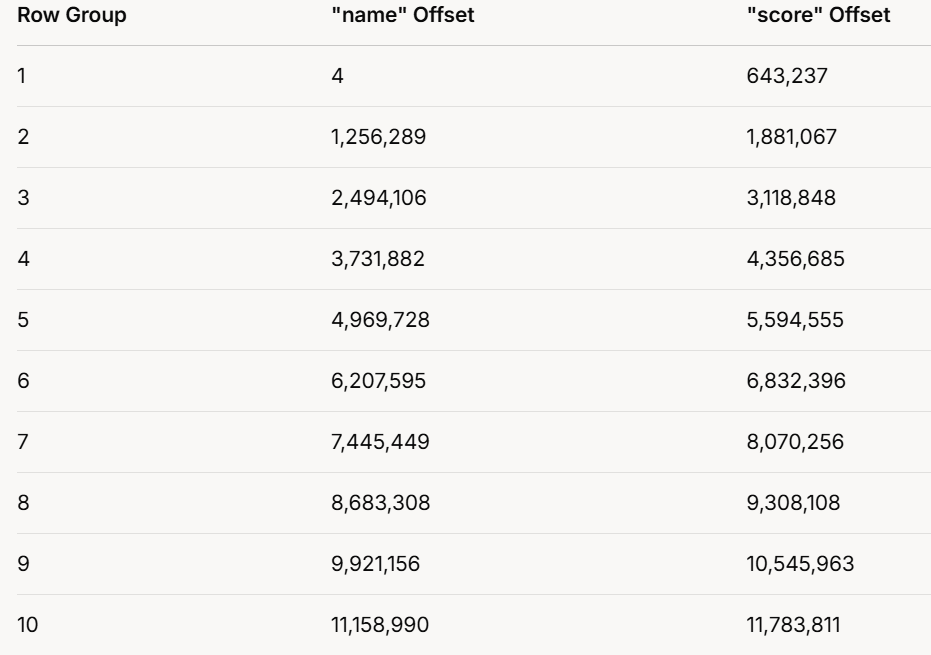
The output repeats for all 10 row groups, with varying offsets. Here’s a table summarizing them:
1.3.1 Observations:
Offsets increase with each row group, showing each has its own dictionary.
"score" offsets are always higher than "name" offsets in the same group, suggesting "name" data precedes "score" data.
Offset differences vary, reflecting different data or dictionary sizes per group.
1.3.2 Significance of Encodings:
The use of multiple encodings optimizes storage:
PLAIN: For unique or incompressible data.
RLE: For consecutive repeats.
RLE_DICTIONARY: For non-consecutive repeats, using a dictionary.
This flexibility allows Parquet to adapt compression to the data’s nature, improving storage and query efficiency.
1.3.4 Conclusion
The Parquet file’s structure is:
Overview: 1,000,000 rows in 10 row groups (100,000 rows each), with 2 columns ("name" and "score").
Encodings: Both columns use PLAIN, RLE, and RLE_DICTIONARY for efficient compression.
Dictionaries: Each row group has separate dictionaries per column, as shown by unique offsets.
Purpose: This setup enhances storage efficiency and speeds up data access, ideal for big data tasks.
2.Understanding How Parquet Scans Data Efficiently
import pyarrow.parquet as pq

parquet_file = "example.parquet"
pf = pq.ParquetFile(parquet_file)

for i in range(pf.metadata.num_row_groups):
    row_group = pf.metadata.row_group(i)
    print(f"📌 Row Group {i + 1}/{pf.metadata.num_row_groups}")
    for j in range(row_group.num_columns):
        column = row_group.column(j)
        print(f"  🏷 Column: {column.path_in_schema}")
        print(f"    📉 Min: {column.statistics.min if column.statistics else 'N/A'}")
        print(f"    📈 Max: {column.statistics.max if column.statistics else 'N/A'}")
        print("-" * 50)
Row Group 1/10
🏷 Column: name
📉 Min: jonny_0
📈 Max: jonny_99999
--------------------------------------------------
🏷 Column: score
📉 Min: 0
📈 Max: 99999
--------------------------------------------------
📌 Row Group 2/10
🏷 Column: name
📉 Min: jonny_100000
📈 Max: jonny_199999
--------------------------------------------------
🏷 Column: score
📉 Min: 100000
📈 Max: 199999
--------------------------------------------------
📌 Row Group 3/10
🏷 Column: name
📉 Min: jonny_200000
📈 Max: jonny_299999
--------------------------------------------------
🏷 Column: score
📉 Min: 200000
📈 Max: 299999
--------------------------------------------------
📌 Row Group 4/10
🏷 Column: name
📉 Min: jonny_300000
📈 Max: jonny_399999
--------------------------------------------------
🏷 Column: score
📉 Min: 300000
📈 Max: 399999
--------------------------------------------------
📌 Row Group 5/10
🏷 Column: name
📉 Min: jonny_400000
📈 Max: jonny_499999
--------------------------------------------------
🏷 Column: score
📉 Min: 400000
📈 Max: 499999
--------------------------------------------------
📌 Row Group 6/10
🏷 Column: name
📉 Min: jonny_500000
📈 Max: jonny_599999
--------------------------------------------------
🏷 Column: score
📉 Min: 500000
📈 Max: 599999
--------------------------------------------------
📌 Row Group 7/10
🏷 Column: name
📉 Min: jonny_600000
📈 Max: jonny_699999
--------------------------------------------------
🏷 Column: score
📉 Min: 600000
📈 Max: 699999
--------------------------------------------------
📌 Row Group 8/10
🏷 Column: name
📉 Min: jonny_700000
📈 Max: jonny_799999
--------------------------------------------------
🏷 Column: score
📉 Min: 700000
📈 Max: 799999
--------------------------------------------------
📌 Row Group 9/10
🏷 Column: name
📉 Min: jonny_800000
📈 Max: jonny_899999
--------------------------------------------------
🏷 Column: score
📉 Min: 800000
📈 Max: 899999
--------------------------------------------------
📌 Row Group 10/10
🏷 Column: name
📉 Min: jonny_900000
📈 Max: jonny_999999
--------------------------------------------------
🏷 Column: score
📉 Min: 900000
📈 Max: 999999
--------------------------------------------------Based on this code, we can analyze the output and observe that the Parquet file is divided into 10 row groups, with each row group storing only the minimum and maximum values for each column.
This structure is beneficial for query optimization because when we read the Parquet file and apply a filter condition, the system does not need to scan the entire dataset. Instead, it only scans the row groups that meet the filter criteria, significantly improving query performance.
By leveraging this feature, Parquet efficiently reduces I/O operations, making it particularly useful for big data processing, distributed computing, and analytical workloads where performance and scalability are critical.
3. How Parquet Optimizes Data Scanning:
Parquet’s row group structure is designed to minimize unnecessary data scanning. Here’s how it works:
Row Groups Divide the Dataset:
Instead of storing one large file, Parquet divides data into smaller row groups.
Each row group contains a subset of the dataset with min/max statistics for each column.
Filtering with Predicate Pushdown:
When a query applies a filter condition (e.g.,
WHERE score > 500000), Parquet first checks the min/max values of each row group.If a row group’s min/max range does not match the filter condition, it is skipped entirely.
Efficient Scanning:
Instead of scanning the entire dataset, Parquet only reads relevant row groups, reducing I/O operations and improving performance.
Example Scenario:
Imagine you have a 1GB Parquet file with 10 row groups, each containing 100,000 rows.
A simple filter like
WHERE score > 700000would:Skip row groups where
scoremax is below700000.Only scan the relevant row groups (e.g., row groups 8, 9, and 10).
This significantly reduces the amount of data read, leading to faster queries.
Conclusion
Parquet’s ability to store min/max statistics per row group enables efficient predicate pushdown filtering, drastically reducing data scanning time. By leveraging this feature, big data applications can process large datasets more efficiently, making Parquet a preferred format for modern analytics.
If you're working with large-scale data, understanding how Parquet scans data can help you write more efficient queries and optimize your workflow!